(Producto Test) (v2)

Regular price $10.00
Regular price $0.00 Sale price $10.00
Shipping calculated at checkout.

Sold by gang sheet to maximize efficiency and value. Easy to apply with cold or hot peel options (both methods work with this film). Designed for ultra-bright, high-impact visuals with professional expanded gamut color technology that delivers colors impossible with standard DTF printing.


  • American Express
  • Apple Pay
  • Diners Club
  • Discover
  • Google Pay
  • Mastercard
  • Shop Pay
  • Visa

Specifications

+

File & Print Setup

Recommended
File Format
• .PNG
• .PDF
• .SVG
• .AI (Adobe Illustrator)
• .PSD (Adobe Photoshop)
Export Settings
300 DPI
Resolution
RGB
Color Mode
Design Background
Transparent background required
Minimum Line Thickness
6 px (at 300 DPI) / 1.45 pt / 0.02 inches / 0.5 mm
Halftone Support
No
Multiple Designs
Combine Multiple Graphics

Pressing & Application

How-to
Peel Technology
Flexible Peel
Press Instructions
300°F (149°C) 10–12 sec

Compatibility & Production

Before ordering
Compatible Fabrics
  • • 100% Cotton and Cotton Blends
  • • 100% Polyester and Polyester Blends
  • • Tri-blends
  • • Nylon (low-heat press needed)
  • • Leather
  • • Denim
Incompatible Fabrics
• Fabrics with coatings (silicone, water-resistant)
• Certain nylon blends
• Fabrics with rough textures
• Highly elastic fabrics
• Sublimated Jerseys (Dye migration may affect print quality.
Production & Turnaround
Production: 1-2 Business Days
Same-day: Available (Extra Fee)
Shipping (pickup & UPS)
• Local Pick-up
• UPS Ground
• UPS 3 days
• UPS 2 days
• UPS 1 day

Notes

Important
• Nylon Fabrics: Apply at 260-265°F (127-129°C) for 6-8 seconds.
• First Wash: Wait at least 24 hours after application before the first wash.

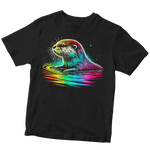
Transform your designs with our Fluorescent DTF Transfers featuring ultra-saturated neon colors and expanded gamut technology for maximum visual impact. These premium neon DTF transfers deliver exceptional color intensity that commands attention in any environment, perfect for designs requiring standout color performance. Bonus feature: They also glow under blacklight conditions for special lighting effects.

Need help choosing the right layout for your Custom DTF Gang Sheets? Here’s how to get the most out of every inch:

  1. For small logos, tags, and branding elements: Use 2"–5" designs to fit multiple graphics per row—you can easily place 6–8 logos across a 22” wide sheet, perfect for sleeves, neck tags, or promotional items.
  2. For full front adult apparel designs: The 9"–11" range gives you high visibility while leaving room for additional small elements. On a 22"x24" sheet, you can combine two front graphics plus branding accents in one layout.
  3. For large back or statement designs: Use 11"–14" transfers. While they take more space, they’re perfect for bold messages or art-driven apparel. Optimize by combining one large print with several smaller elements on the same sheet.
  4. For youth and toddler clothing: Scale designs to 3"–8". Their smaller format means you can fit 3–5 youth-sized prints per row, making gang sheets a smart option for multi-size production.
  5. For hats, totes, and small accessories: Stick with compact 2"–4" graphics. These are fast to apply and let you include dozens of units per sheet, maximizing every inch.

🧠 Smart tip: Designing your custom gang sheets with varied sizes gives you flexibility and saves time on reordering. Whether you're producing for a brand, event, or product line—make your layout work smarter, not harder.

Need help planning your layout? Visit our DTF sizing & layout guide or contact us for tips tailored to your design and gang sheet setup.

Free Builder

Quickly build your layouts using our free online tool! Follow this easy tutorial and start creating in minutes with our Free Builder.

Pro Builder

Take your designs to the next level with advanced layout features using our Pro Builder for precise control and faster production.

Canva Tutorial

Even if you're a beginner, this tutorial shows how simple it is to prepare layouts in Canva. Learn step-by-step with our Canva guide.

Photoshop Tutorial

Use Photoshop effectively for your custom printing projects to save materials and speed up production. Follow our complete Photoshop guide.

Illustrator Tutorial

Discover tips and tricks for creating perfect layouts in Adobe Illustrator. Unlock powerful techniques in our Illustrator guide.
🎁 First-Time Customer Special

🎫 20% discount on your first order
Use Coupon Code: 20FB

📦 Free Shipping Options

🚚Free Ground Shipping for orders over $100
2️⃣Free 2nd Day Shipping for orders over $300
🚨Free Next Day Shipping for orders over $500

We are proud of our products and stand firmly behind their quality. That's why we offer a satisfaction guarantee on all heat press applications. If you encounter any issues with your order, simply let us know, and we'll promptly replace them free of charge. Your complete satisfaction is our priority - we're not happy unless you're happy with your results!

Regular price $10.00
Regular price $0.00 Sale price $10.00
  • 20% OFF your first order with code 20FB
  • No Minimums or Setup Fees
  • 100% Satisfaction Guaranteed
  • 20% OFF your first order with code 20FB
  • No Minimums or Setup Fees
  • 100% Satisfaction Guaranteed
Add a video or an image in the section settings.
Add a center image in the section settings
Add step blocks in the theme editor.

If you have any questions, please contact us at:

  • Phone

    (305) 542-5752

  • Email

    info@dtftransfersnow.com

  • Location

    13276 SW 120th St, Miami, FL 33186

Need More Transfers? We’ve Got You Covered

🔴 Please note: if your design has fine details, we recommend letting the sheet cool completely before peeling.